What's new in DiffPlug 2.13.0
New in this release - General
- The manual now shows Mac keyboard shortcuts when viewed on macOS.
- Refreshed application and installer icons.
New in this release - Simulink
- Added support for MATLAB R2025b, R2026a, and R2026b, including R2026b's new model format and embedded test harnesses.
- Review changes as you go. Use Mark reviewed for one element or Mark subtree reviewed for an entire subtree. Reviewed changes leave the Remaining view and stop highlighting their ancestors. Switch to Reviewed to revisit them, or use Undo review. Review progress lasts for the current comparison session; reopening or reloading starts a new review.
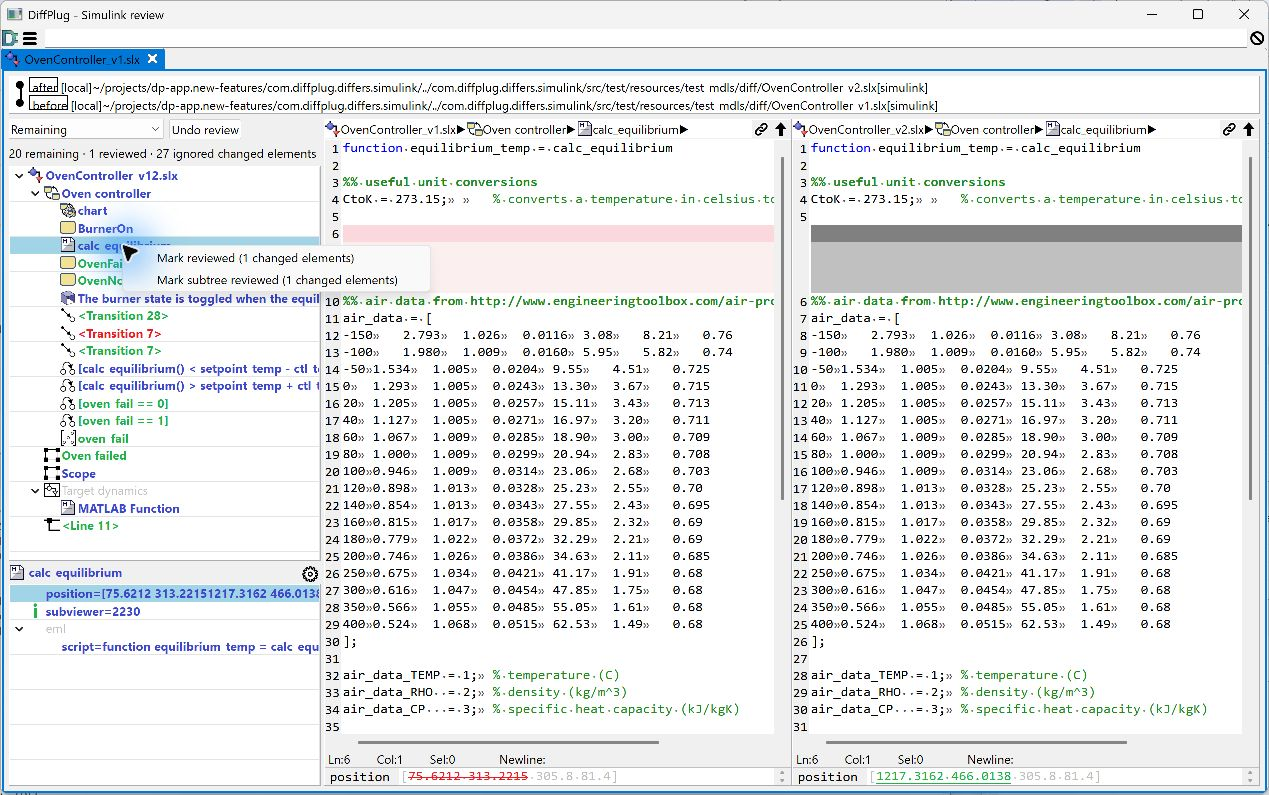
- Inspect what was filtered out. Switch between Remaining, Reviewed, Ignored by rules, All changes, and All non-ignored changes without losing access to the original differences. Counts show changed elements, rather than individual properties. See reviewing Simulink changes.
- Choose what goes into a report. Export Remaining changes, or include reviewed changes with All non-ignored changes. Reports record the selected scope and active filters. See generating reports.
Fixed in this release - Simulink
- Fixed corrupted diagram images in reports and image exports at different display scaling settings.
- Reduced memory allocation when loading Simulink models and data dictionaries.
- Fixed referenced-model port labels appearing on the wrong ports when saved names were missing. Unnamed ports now retain their positions.